
From the field to the pay slip, in one system
Farms, planting, production, the packhouse, the workshop, payroll, health & safety, sales, accounting, costs, trends and forecasts — built for pineapple and fruit farms, in English and Spanish.
One platform for the whole pineapple operation
The Agentic Grove runs the field, the packing plant, the people, the sales and the money of a pineapple or fruit farm in one system, from one set of records.
It is built for Costa Rica — CCSS and INS, the quincena and the aguinaldo, colones and dollars — and works in English and Spanish, on a phone in the field or a desktop in the office. Each company's data is kept separate from every other company's, enforced on the server.
- 19business modules, one login
- 15lifecycle phases tracked on every block
- EN · ESon every screen, printout and email
- 1 appfor the phone in the field and the desktop in the office
Everything the platform does
Every module, under the same menu sections you see after signing in. Select a module's name for the details.
| Module | What it does | Who uses it |
|---|---|---|
| Home | ||
| Today | Your morning page: what needs attention today, your key numbers and shortcuts, with one menu and a Ctrl/⌘+K search for every module. | Everyone who signs in; it shows what their role and access allow. |
| Operations | ||
| Farms | Farms, lots and blocks on a Production Map coloured by the 15 phases; every block keeps its own field log. | Everyone. Field roles log work on the farms assigned to them; viewers only read. |
| Planting | Planting counts by terrace and bed, the R-RZ-0001 record sheet, closing a block's planting and the planter report. | Field workers and planters capture; Managers close blocks and run the planter report. |
| Tasks | Field work assigned to a farm, lot or block with a due date, followed on a board or from a phone. | Everyone except viewers; Admins and anyone allowed to assign give tasks to others. |
| Groups | Blocks grouped by crop stage, each following its application program, with a full change history. | Managers and Admins; can be granted to others. |
| Production | Programs by stage, the weekly application plan and order, sampling, the agrochemical warehouse and the boxes-to-containers estimate. | Managers and Admins; can be granted to others. |
| Harvest Calendar | Harvest week and tonnes for every block, PHI conflicts, weekly capacity and supply matched to buyers. | Admins edit; Managers view. |
| Terrace Report | The terrace-by-terrace planting and fruit sheet of a block, printable with four sign-offs. | Managers print; Admins sign. |
| Plant | ||
| Packhouse | Trucks in, quality cuts, pallets with barcode labels, the cold chamber and containers out, traced from block to customer. | Packhouse staff by area (quality, production, dispatch, packaging, maintenance, management); Managers read. |
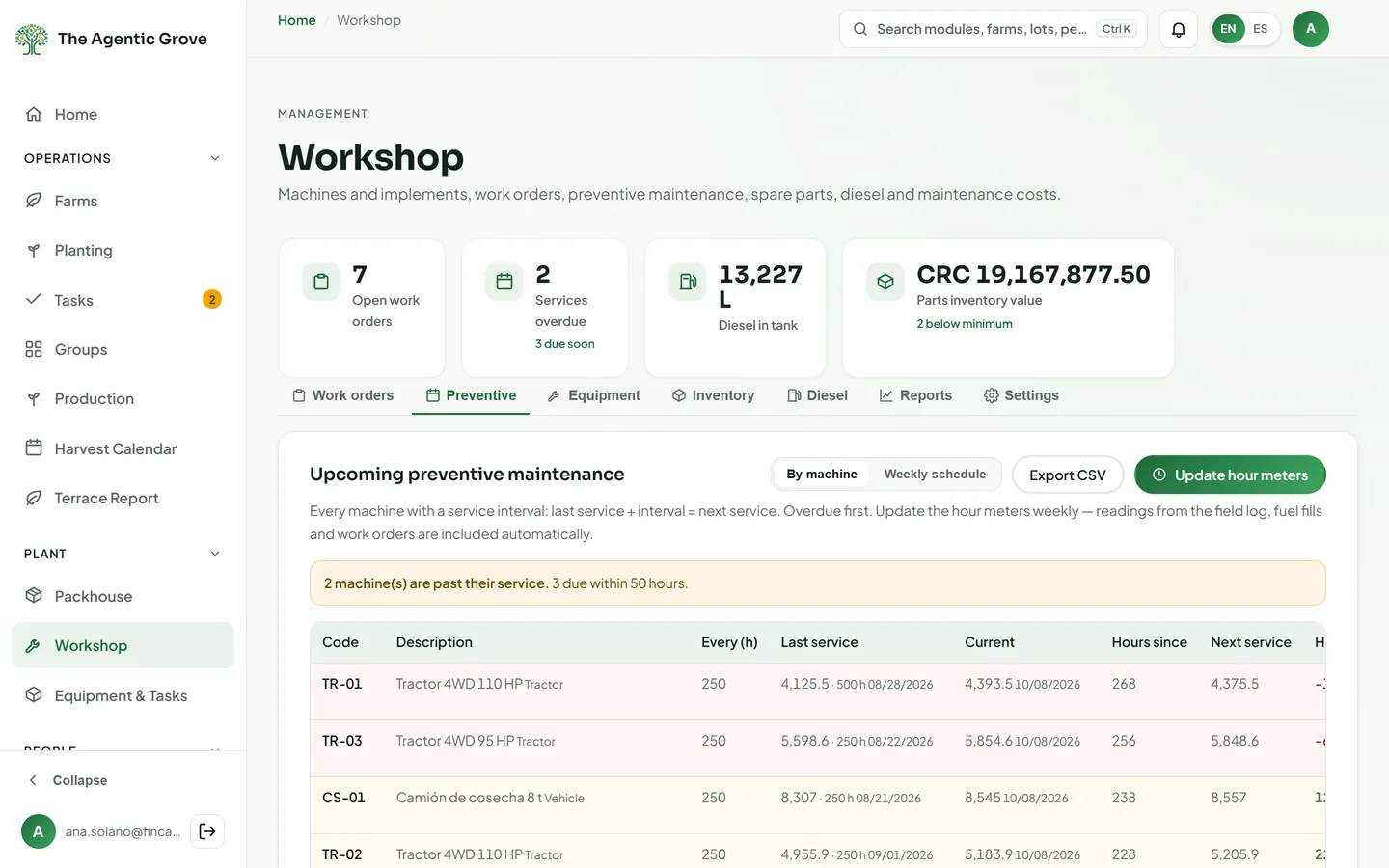
| Workshop | Work orders, preventive maintenance by hour meter, the spare-parts warehouse and diesel per machine. | Managers and Admins; can be granted to a workshop manager, who never sees payroll. |
| Equipment & Tasks | The master list of machines and field tasks, with the hourly rate each logged hour is costed at. | Admins edit; Managers view. |
| People | ||
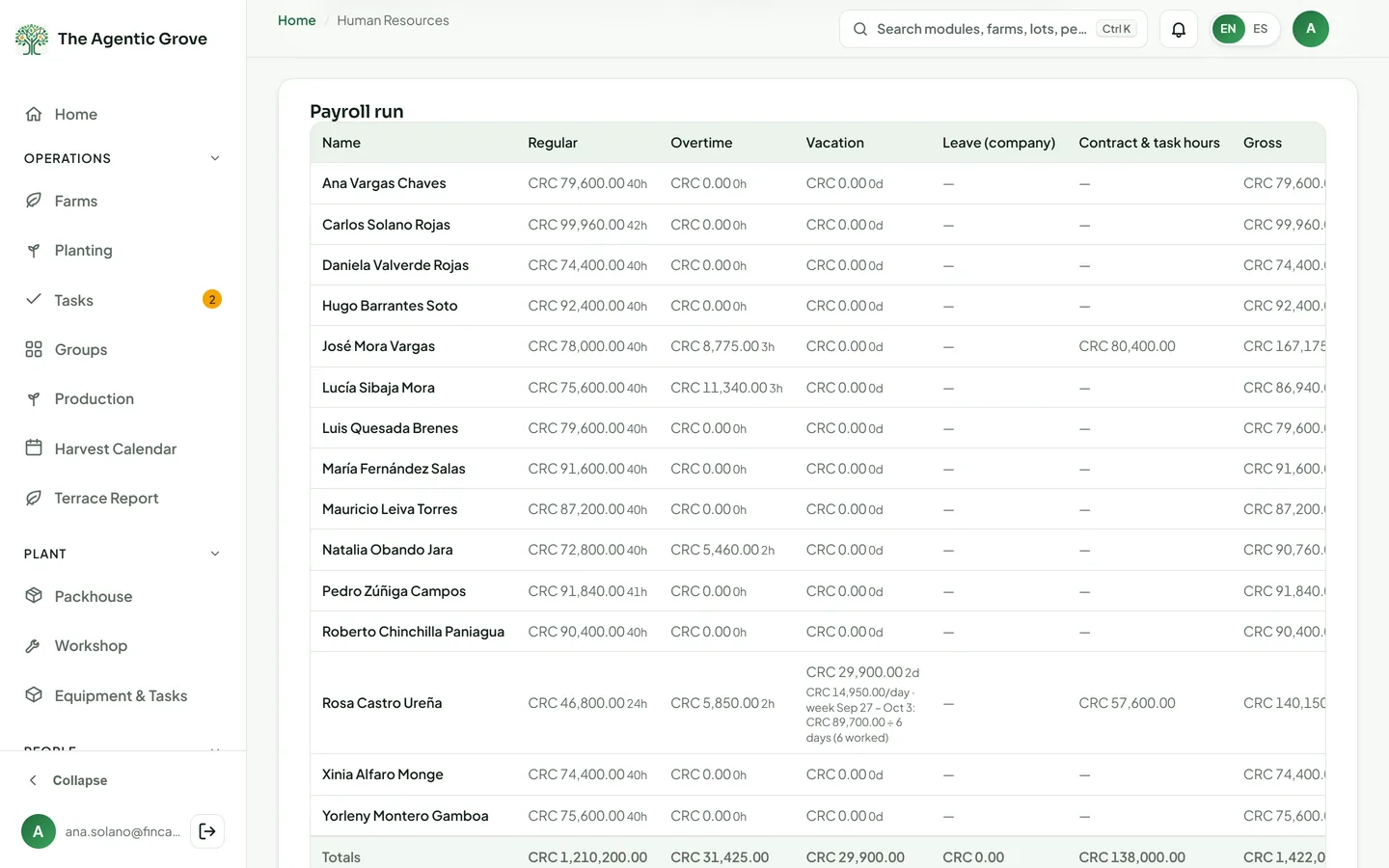
| Human Resources | Costa Rican payroll from the time grid to the bank file: CCSS, INS, aguinaldo, vacations, leave, piece work and pay slips. | Admins. Managers see the team list, read-only; pay and personal data stay with Admins. |
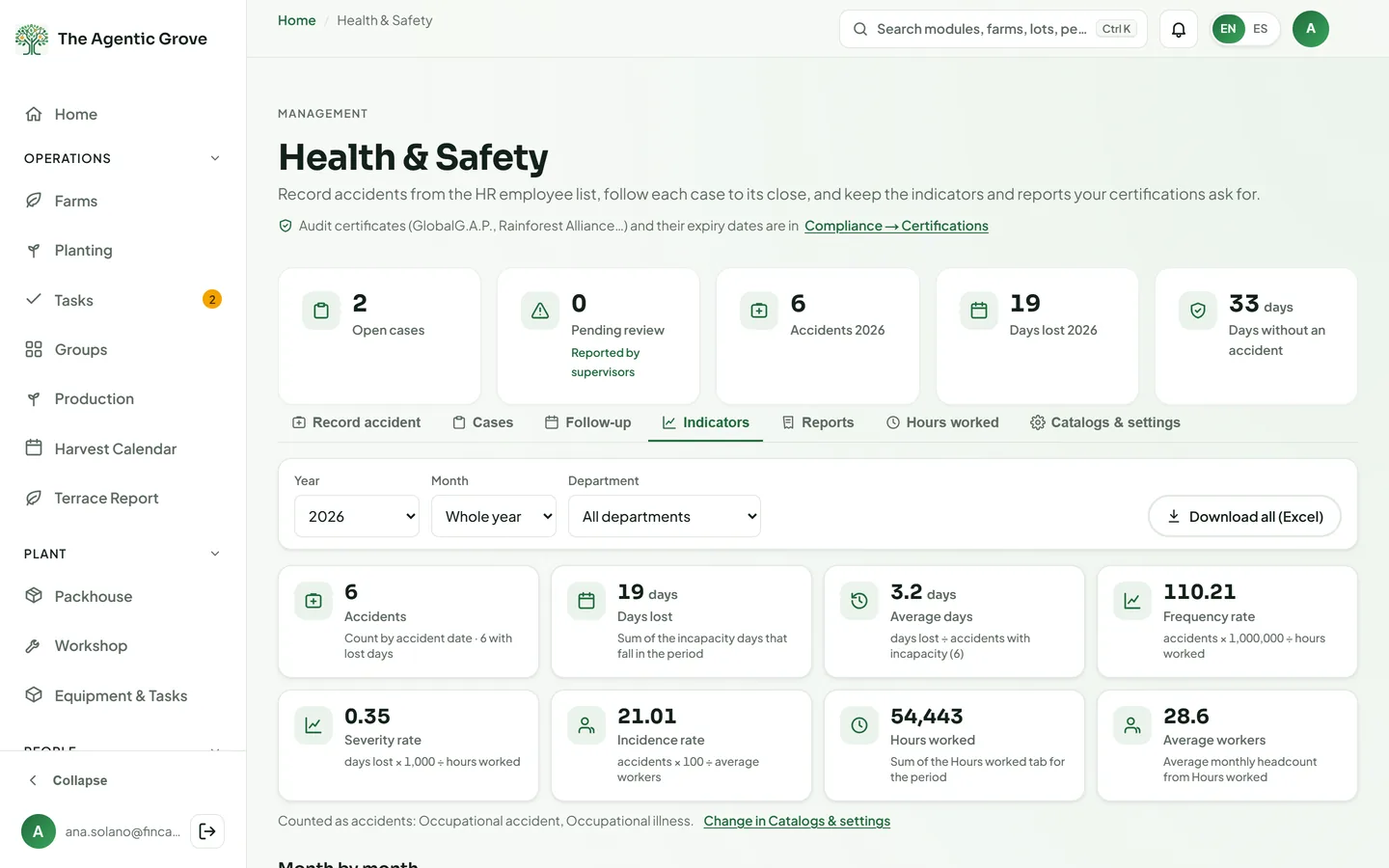
| Integrated Management System (SGI) | Occupational health & safety (SGI): work accidents from the first report to return to work, INS/CCSS appointments, corrective actions and accident-rate indicators. | Managers record and follow their own cases (can be granted to a supervisor); Admins review all. |
| Commercial | ||
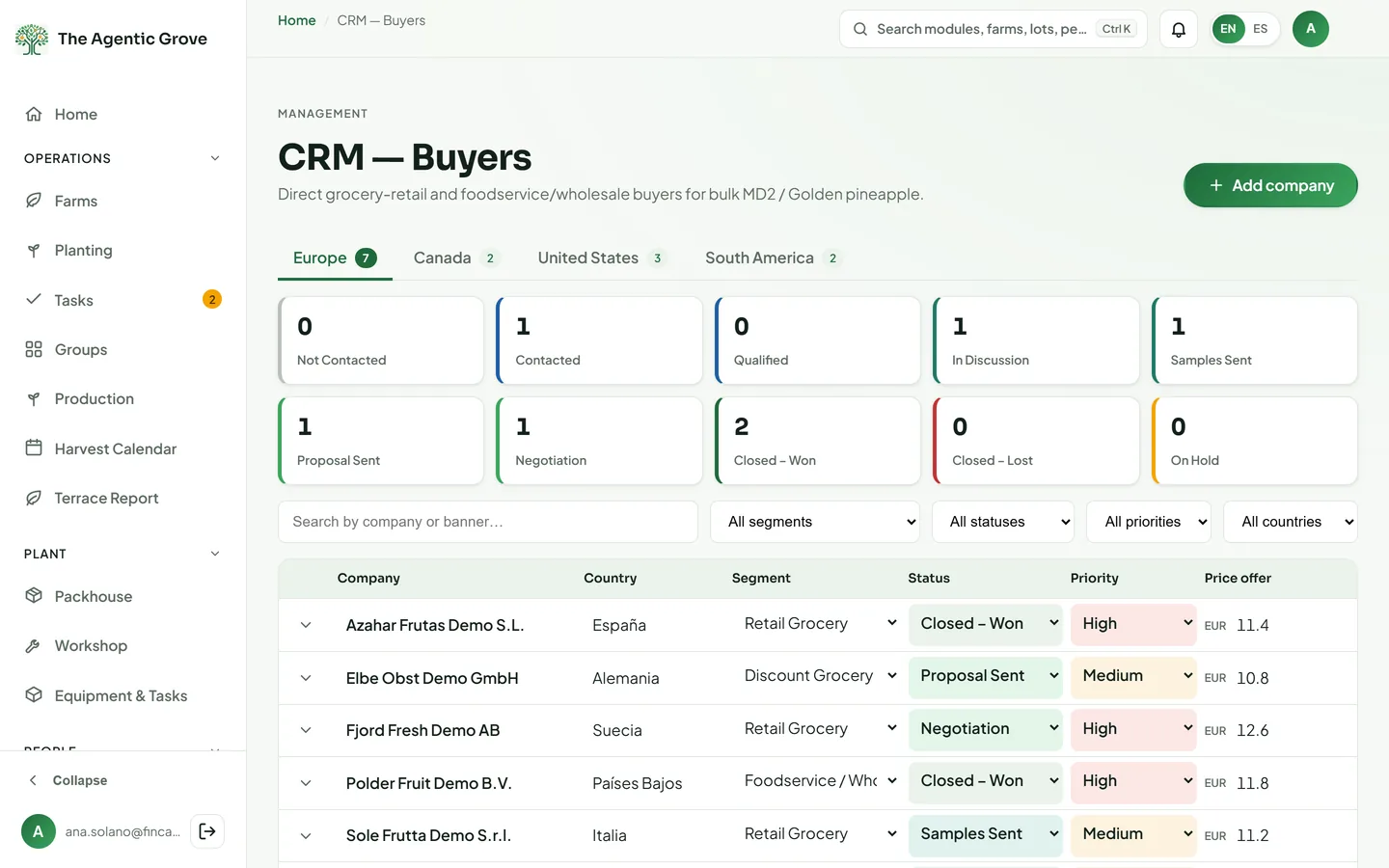
| CRM | Your buyer pipeline by region and segment, with offers, contacts and history, tied to harvest supply. | Admins edit; Managers view, and others can be given view. |
| Pricing | The price list everything is costed from: agrochemical products, rates and the exchange rate. | Admins edit; Managers view. |
| Finance | ||
| Finance | Accounting with separate books for each legal company: sales, purchases, bank, ledger, statutory reports and Hacienda v4.4 electronic documents. | Owners and Admins, plus anyone given a Finance level (viewer, bookkeeper or accountant) for chosen companies. |
| Cost Model | The cost per block, lot, farm, hectare, plant and kilo, and the margin once the fruit is invoiced. | Admins; Managers view. |
| Analytics | Four dashboards — Farm, Packhouse & Sales, Finance & Profitability and the Overview — with plans vs actual, direct cost over time, gross profit by channel and profitability by area. | Admins; Managers view. |
| AI Insights | ||
| AI Insights | Trend analysis, forecasts with intervals, anomalies, drivers and benchmarks and a 13-week cash forecast computed from your own records — every figure labelled with its method and its confidence, with plain-language explanations written by Gemini. | Admins; Managers view. The cash forecast needs a Finance grant. |
| Administration | ||
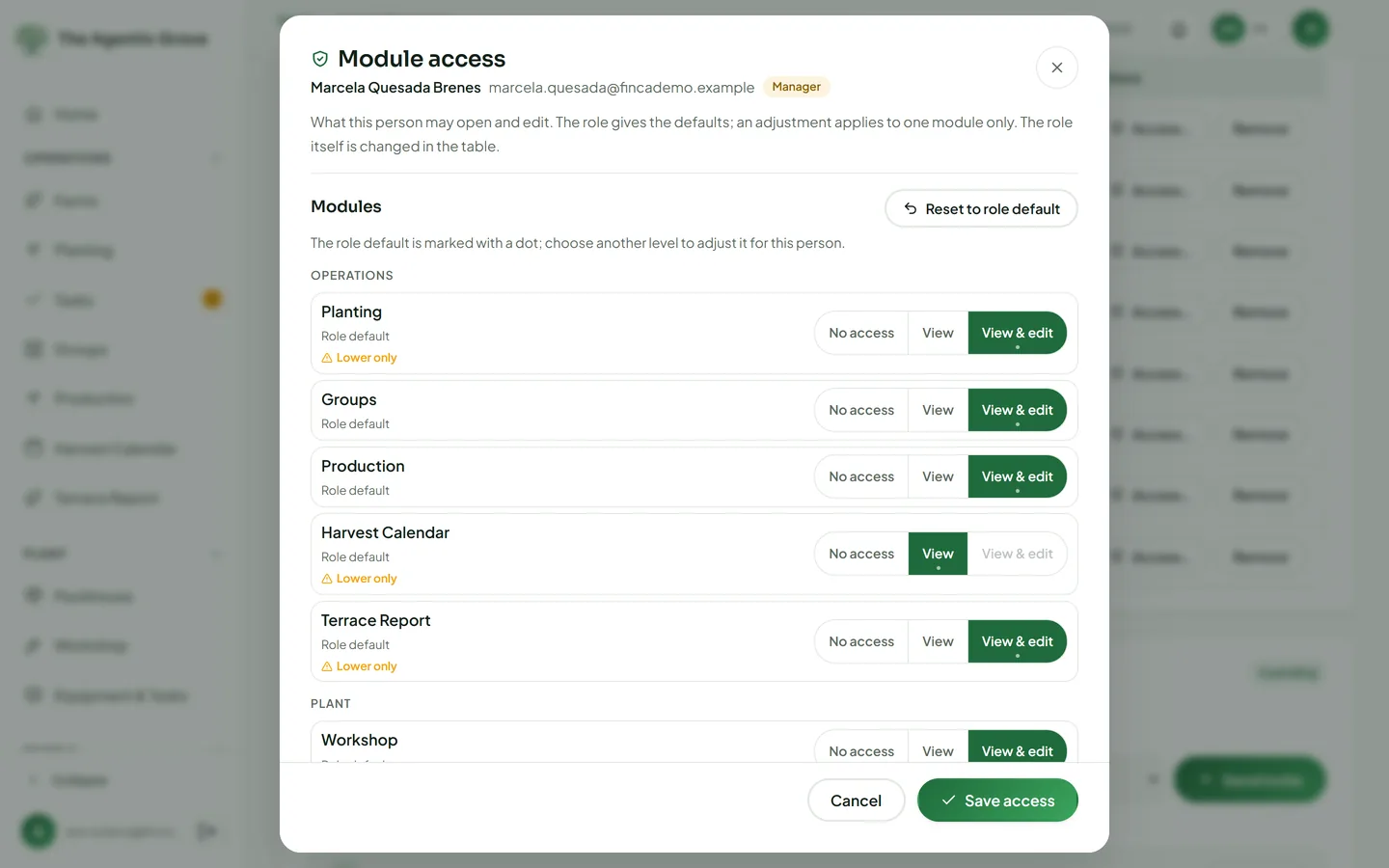
| Users & Access | Invite people, approve sign-ups and set each person's role, farms and access, module by module. | Owners and Admins. |
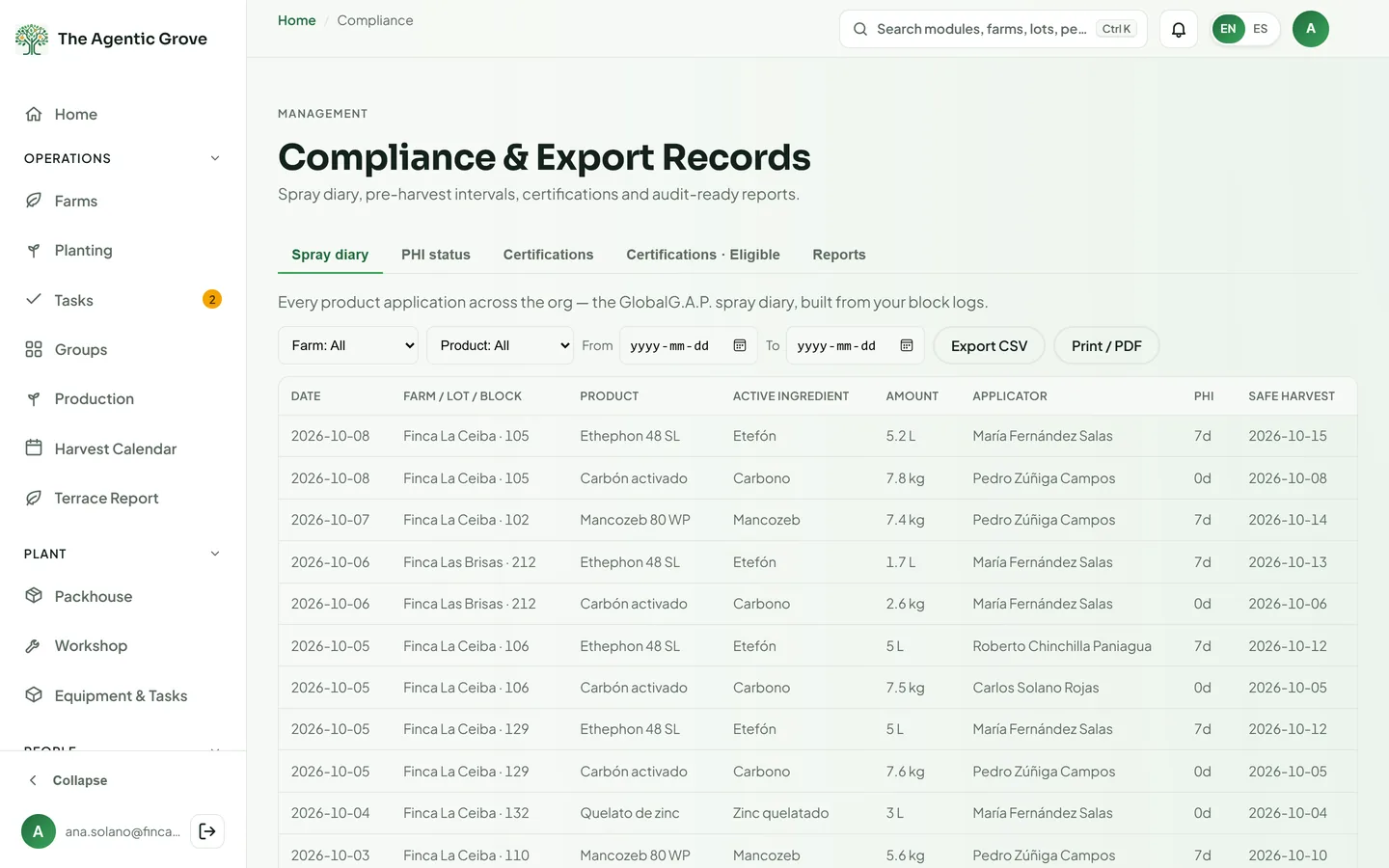
| Compliance | The spray diary, pre-harvest interval (PHI) status per block, certifications and buyer eligibility. | Admins edit; Managers view. |
| Activity Log | A log of field actions — who did what, and when — that cannot be edited. | Admins; Managers view. |
| Import blocks | Load the whole farm layout from your area-overview spreadsheet, checked against its own totals. | Admins; Managers view. |
| Test Script | A bilingual acceptance test script — 552 numbered tests in 43 sections, from payroll to the packhouse, finance and access — run on your own data before go-live. | Admins. |
| Farm guide | Step-by-step help in English and Spanish, with screenshots, inside the app. | Everyone who signs in. |
| Platform-wide | ||
| Company data kept separate | Each company's records are walled off from every other company's by server-side rules, not just hidden on screen. | Every company, automatically. |
| Roles & permissions | Seven roles, access set module by module (none, view or edit), packhouse areas and Finance levels per company. | Set by Owners and Admins. |
| English & Spanish | Every screen, printout and customer email in both languages; each person picks theirs. | Everyone. |
| Phones & offline | Installs on a phone. Field logs, bulk logs, equipment hours and tasks queue without signal and sync later; planting and other saves need a connection. | Field crews and supervisors. |
| Imports | Farm layout, planting counts, employees, pay and time sheets, Kizeo timesheets, programs, equipment, diesel, QuickBooks Online accounts and vendors, and bank statements, each previewed before saving. | Admins and the module's managers. |
| Exports & printouts | Excel and CSV downloads, and printable documents: pay slips, work orders, R-RZ-0001 sheets, pallet labels, guides, invoices and reports. | Anyone who can open the module. |
| Bilingual invitations, welcome and password emails, and pay slips sent from the platform, with the delivery status of each slip. | Your team and your employees. | |
| Audit trail | Records are voided with a reason instead of deleted, posted entries are reversed, and logs keep who changed what. | Runs on its own; Admins review. |
| Nightly backups | The whole database is exported every night; the files are copied every night to a bucket kept for five years. | Runs automatically. |
Home
Where everyone starts the day.
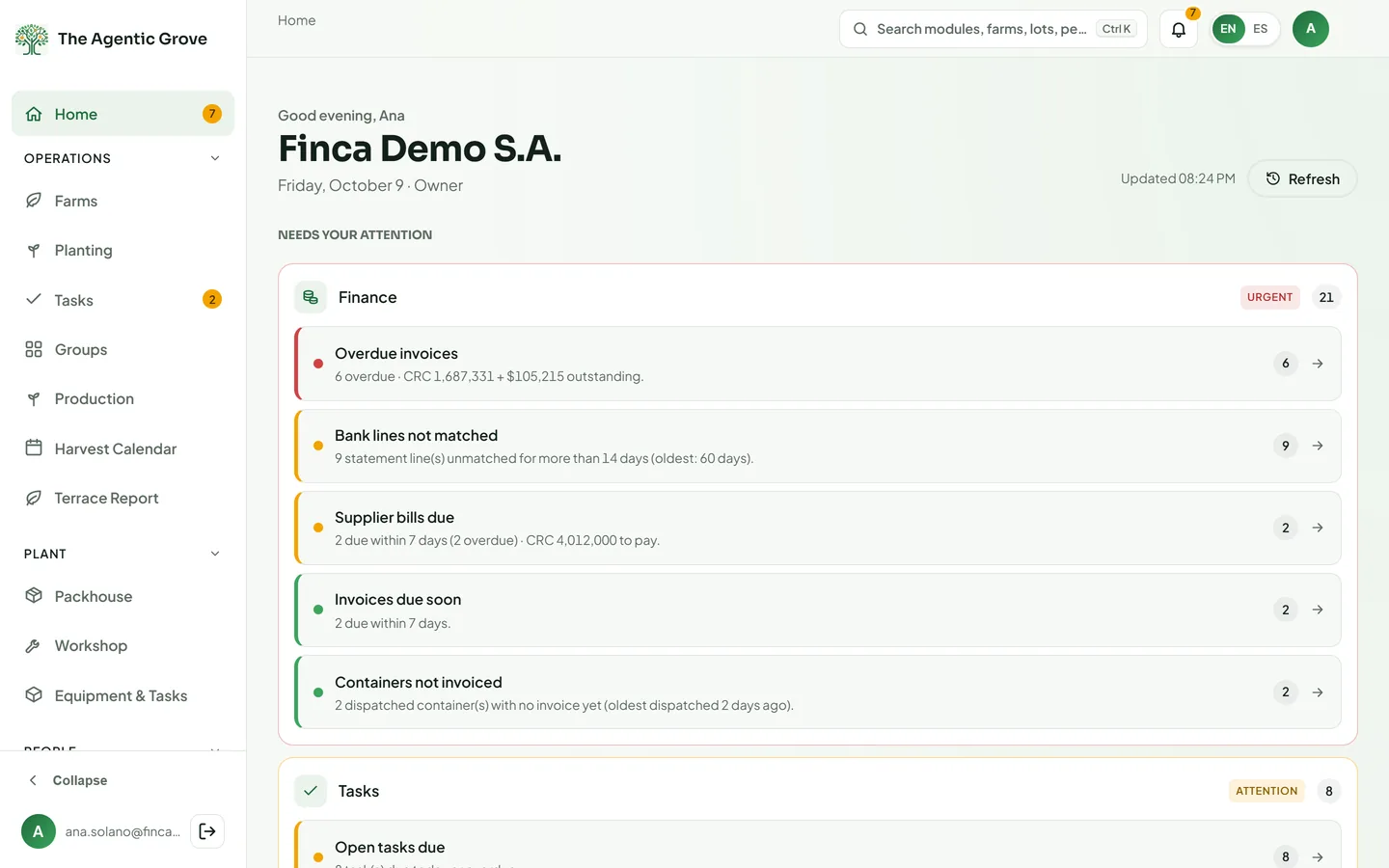
Home & one menu
Start the day with what needs attention
Everyone lands on Home, shaped to their role and access. One menu, grouped the way the business runs, leads to every module they may open.
- Needs attentionRule-based checks flag harvests due, blocks stuck in a phase, overdue invoices and bills, PHI conflicts, expiring certifications, pallets aging in the cold chamber and more.
- Key numbers by roleOwners see receivables, boxes, pallets and open work orders; packhouse and field staff see their own day.
- Shortcuts they may useNew task, record harvest, new pallet, record accident, new invoice — offered only where the person can edit.
- One menu, and Ctrl/⌘+KOperations, Plant, People, Commercial, Finance and Administration; a command palette jumps to any module, farm, lot or employee.
- Made for phones tooA bottom bar on phones, a bell with the count of open alerts, and a company switcher for people in several companies.
Operations
The field: blocks, planting, work, programs and the harvest.
Farms
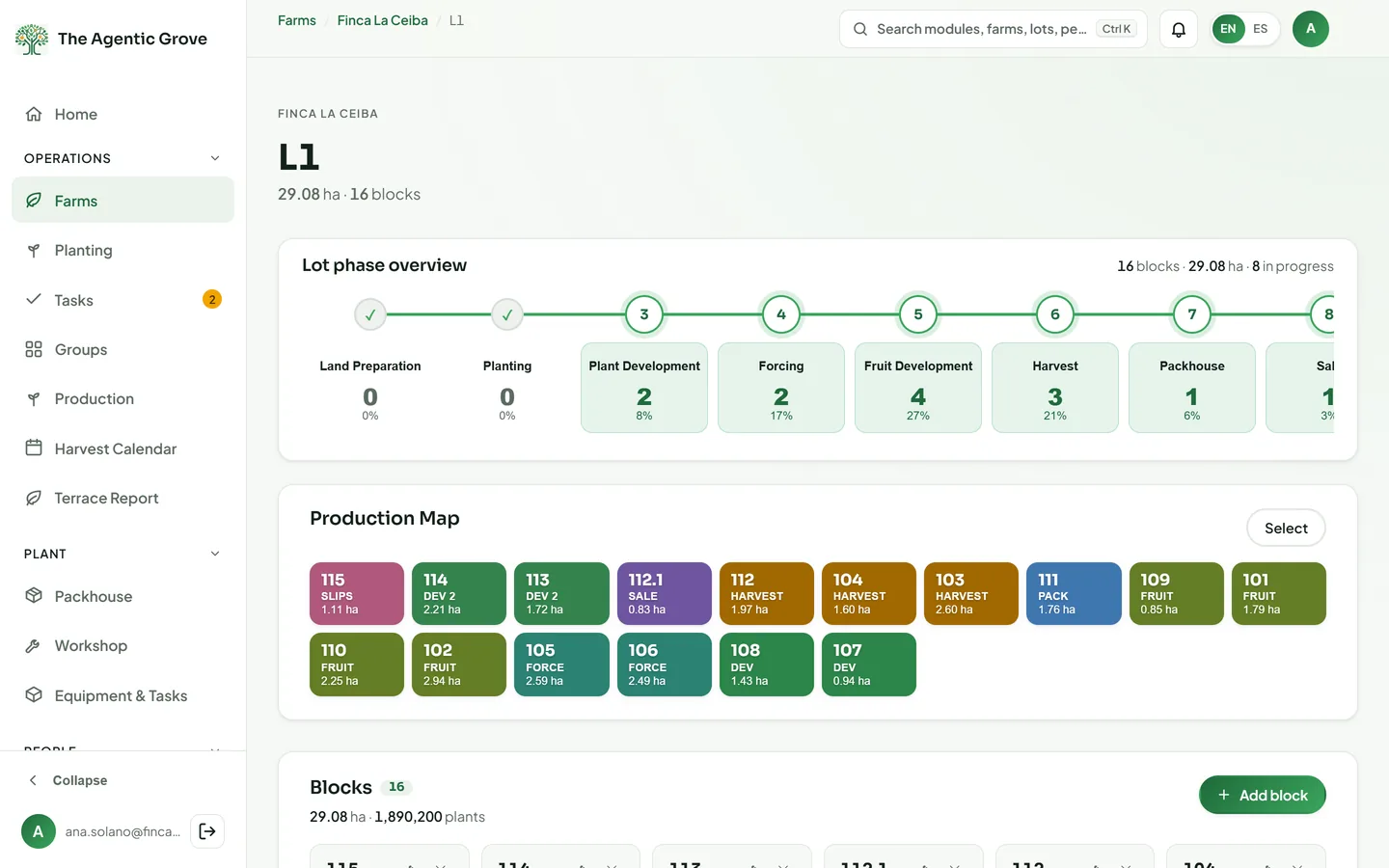
Every block, every phase, every record
Farms are split into lots and blocks. Each block moves through the 15-phase MD2 cycle and keeps its own log of everything that happened to it.
- Production MapEvery block coloured and filtered by phase; advance or revert a block, or advance a whole selection in one action.
- A field log per blockProduct applications with a PHI hint, equipment hours, fuel, harvest (kg, boxes, Brix), mortality and quality, planter counts, notes and photos.
- Log inputs in bulkOne application, machine entry or note recorded on many blocks at once.
- Crop cyclesClose a lot's cycle when every block is done, start the next one, and browse past cycles read-only.
- Roles that fit the fieldTractor operators log machine work, planters log planting, and field roles work only on the farms assigned to them.
Planting
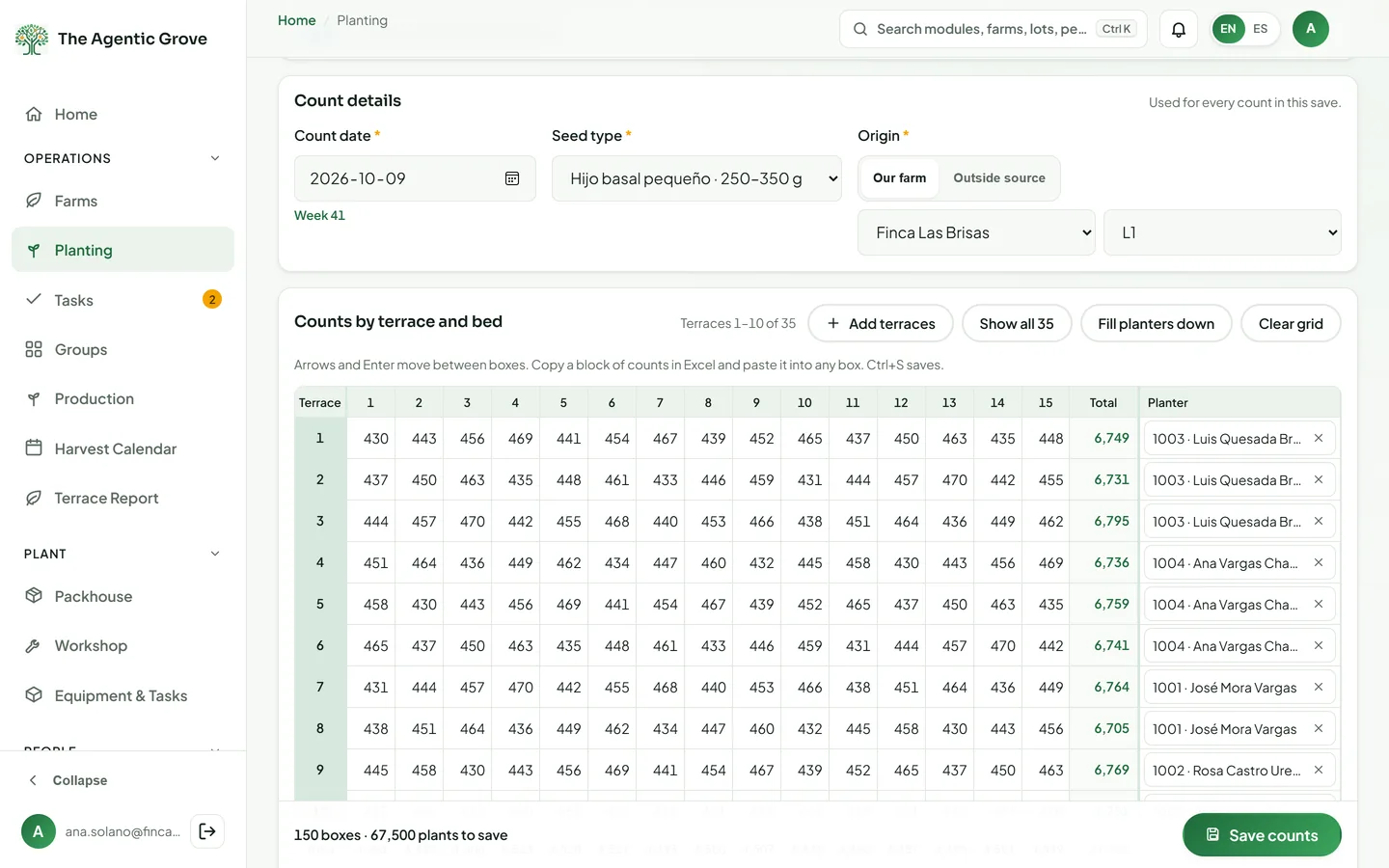
Planting counts, the way the crew writes them
Capture counts by terrace and bed, close each block's planting record, and pay planters from the same numbers.
- Capture gridPaste from Excel or type by terrace and bed, with the date, slip type and origin; an unsaved grid stays on the device.
- Spreadsheet importBASE DATOS SIEMBRA sheets come in with a template and a check for counts already recorded.
- R-RZ-0001 record sheetPrinted or exported to Excel for one block, or up to 40 sheets at once.
- Close and reopenPlanted area and a weighted planting date are calculated; reopening needs a reason and keeps the history. Rows are voided, never deleted.
- Planter report and payCounts by ISO week and planter, to Excel or print, sent to Human Resources as piece-work entries.
- Cycles and correctionsCycle codes such as 268_2027, a formal cycle closure that opens the next one, planted beds locked against a second record, and corrections approved by a responsible person with their reason.
Tasks
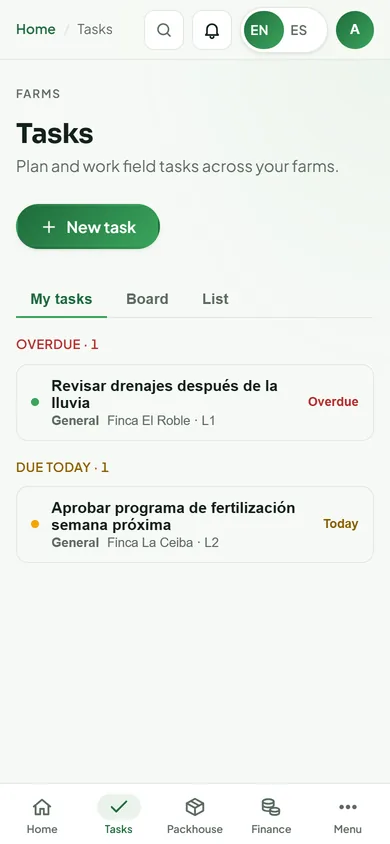
Field work assigned, done and checked from a phone
Spraying, fertilizing, irrigation, harvest, scouting and maintenance — assigned to a block with a due date and followed until it is done.
- Tasks where the work isType, priority, farm, lot or block, assignee, due date and phase.
- My tasks, board and listDue-today and overdue buckets; start, complete, reopen or cancel.
- Notes and photosAdded from the phone, in the field.
- Straight to the logA finished spray, fertilizer or harvest task opens the block's log to record the work.
- Who may assignAdmins, plus anyone given “Can assign tasks”; open tasks show on Home and in the menu.
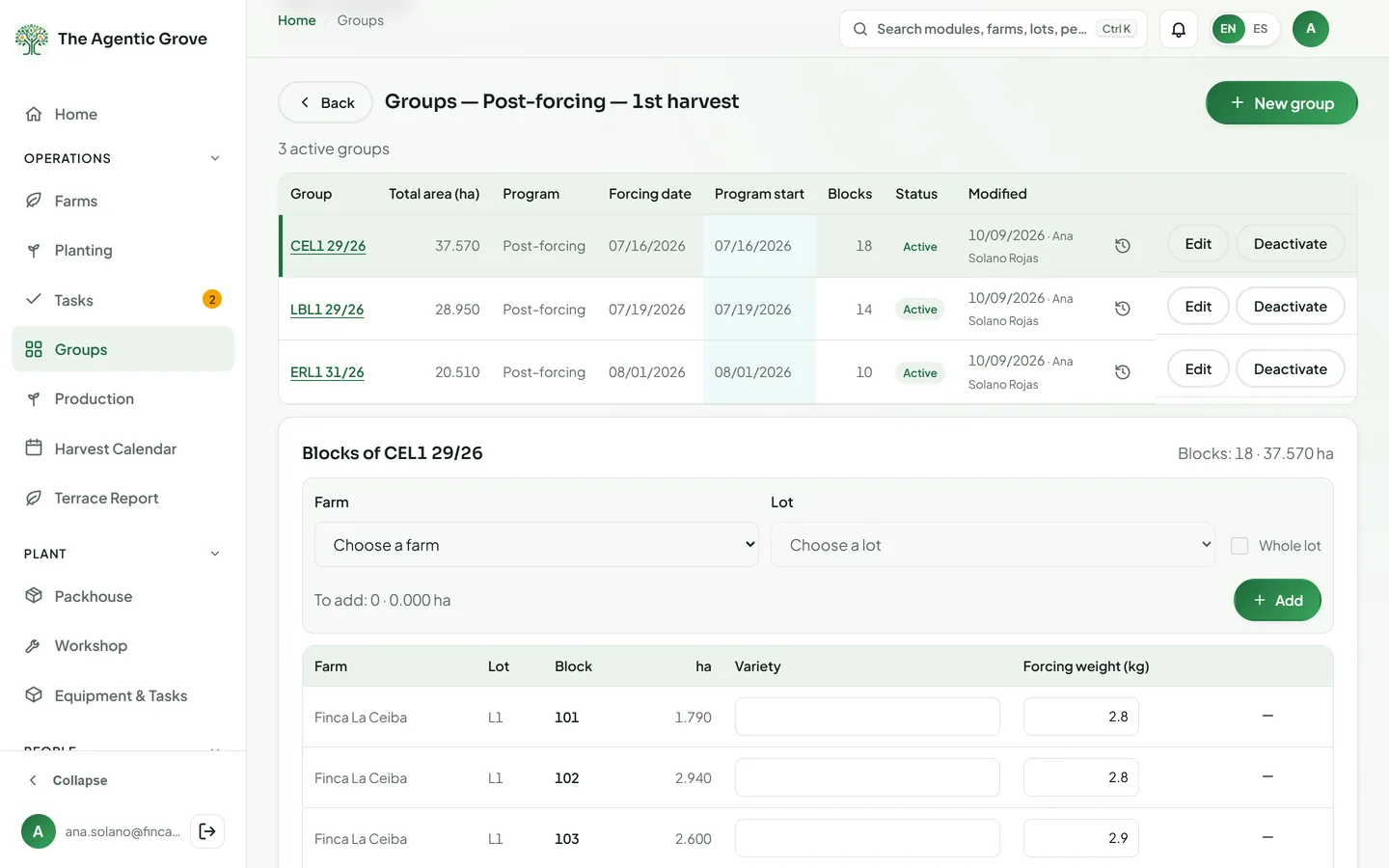
Groups
Blocks grouped by stage, each on its program
Group blocks the way the farm runs them, so each group follows the right application program from the right date.
- Six stagesLots in preparation, development and post-forcing for the 1st and 2nd harvest, and seedbeds.
- Anchored to the cropA group's program starts from its weighted planting date or its forcing start.
- Build groups fastAdd blocks by farm, by lot or a whole lot at once, with variety and forcing weight per block.
- Changes with a reasonA program change needs a reason, and every change is kept in an append-only history.
- Nothing left outViews of groups with no program, program changes (with CSV) and planted blocks not yet in any group.
Production
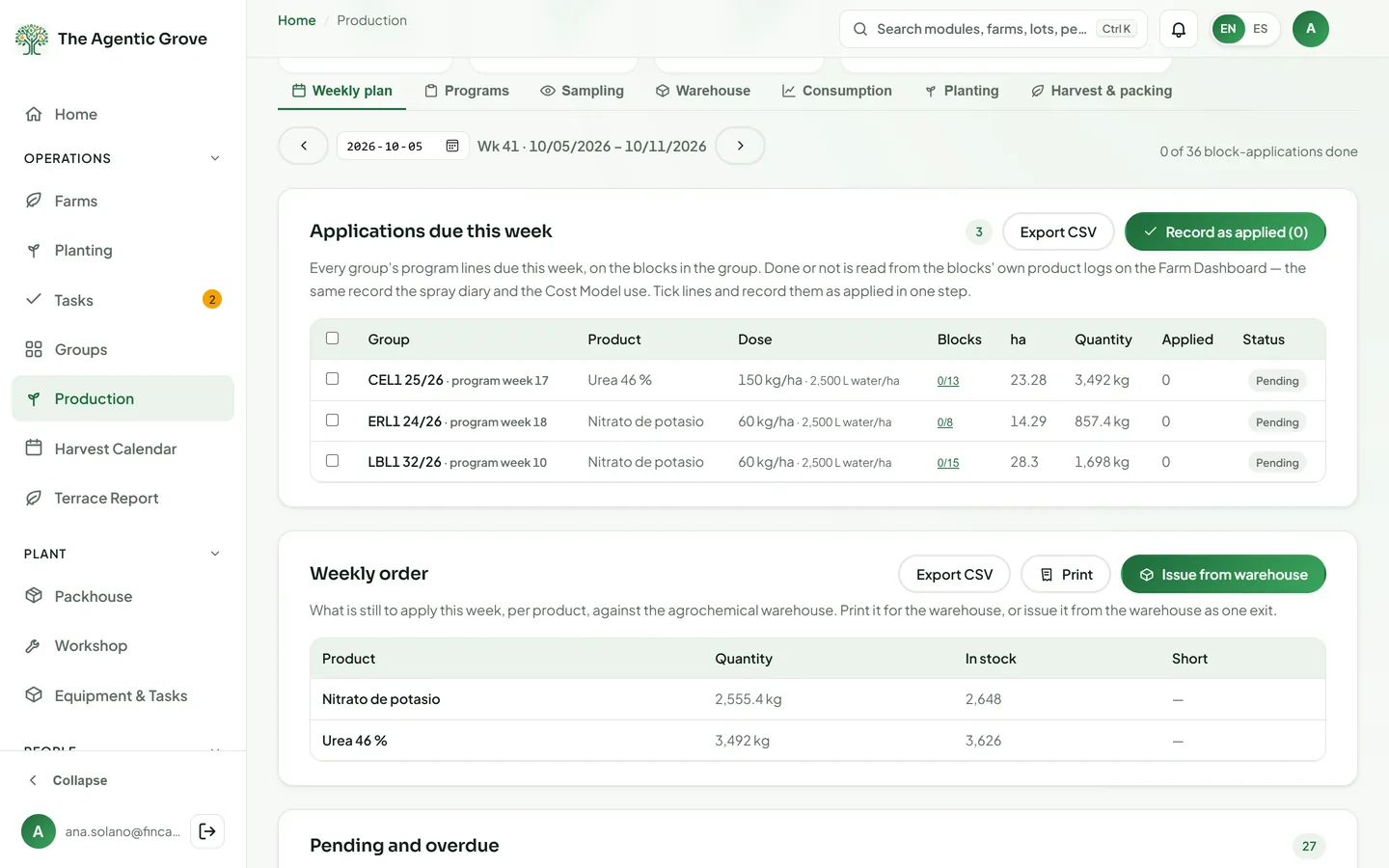
The weekly plan, the order and the warehouse — in one place
Programs by stage, a weekly plan whose status comes from the blocks' own logs, the agrochemical warehouse and the harvest estimate.
- Programs and the weekly planDose per hectare × block area; done, partial or overdue read from the field logs; a line recorded as applied in one step.
- The order, against stockThe week's order checked against the warehouse, printed or issued as one exit.
- SamplingPlans, printable field forms, results typed or imported from Kizeo, and a recommendation when a count passes its threshold.
- Agrochemical warehouseEntries by supplier in colones or dollars with a price-range warning, exits tied to applications, weighted-average cost, void-only history.
- Consumption and projectionBy lot with brand and active ingredient, scheduled vs actual, projected by week, month and year.
- Harvest and packing estimateBoxes, pallets and containers by size mix, fruit still in the field, packing records from the Packhouse and boxes per hectare.
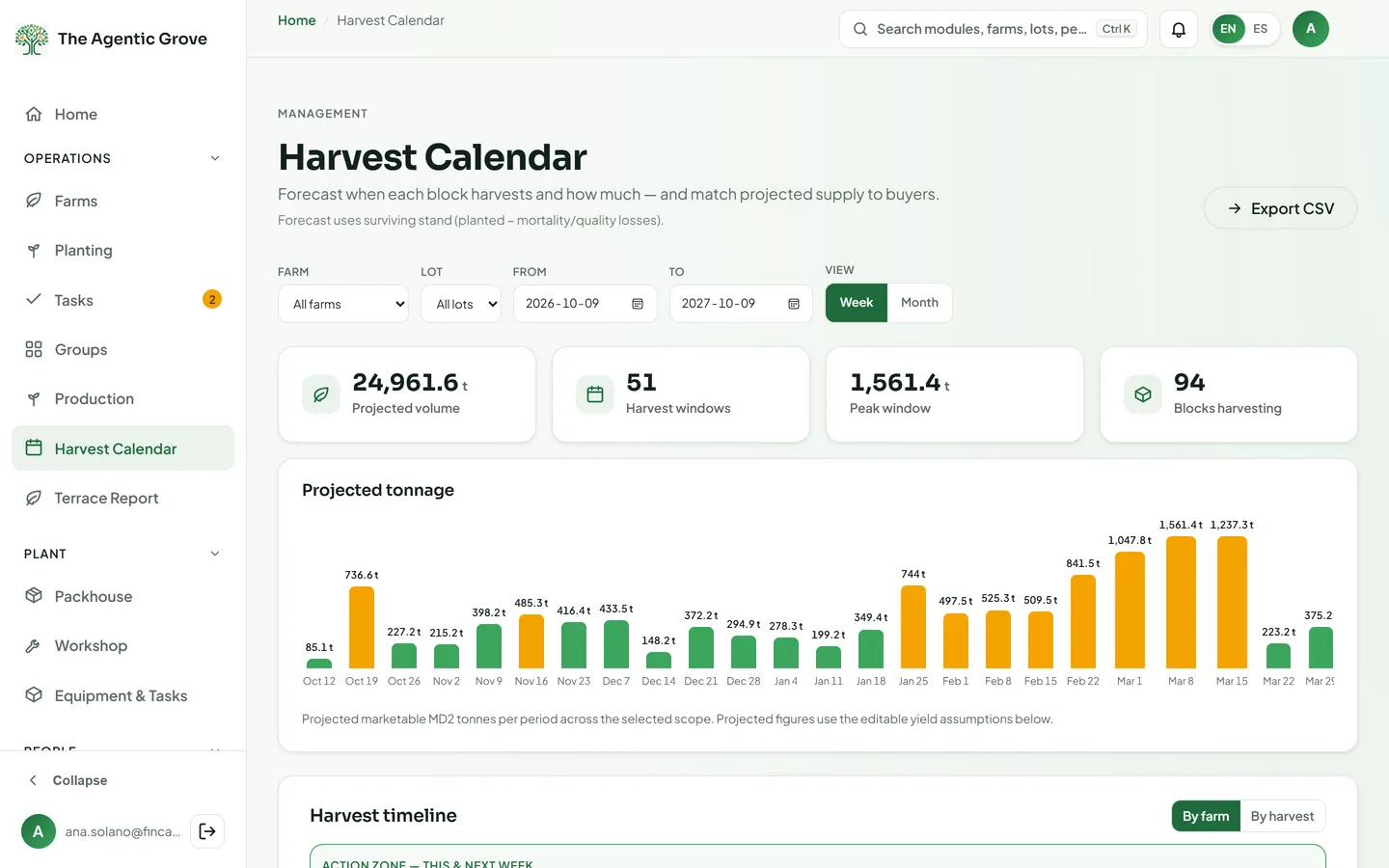
Harvest Calendar
Which week every block harvests, and how many tonnes
Forecast the first and second harvest of every block from its phase, then match that supply to your buyers.
- Forecast by blockHarvest week from the block's current phase and the phase durations you set.
- Tonnage you can explainSurviving plants × fruit per plant × fruit weight × pack-out, with a ratoon factor for the 2nd harvest.
- PHI conflictsA harvest that falls before the pre-harvest interval clears is flagged.
- CapacityContainers and crew-days per week against weekly capacity; week or month view, chart, timeline and CSV.
- Supply vs demandWeekly tonnes assigned to CRM buyers, capped at what is still unassigned.
Terrace Report
The official terrace sheet, signed off
The terrace-by-terrace planting and fruit sheet of a block, built from the planting counts and printed for signature.
- Plants viewThe R-RZ-0001 sheet by terrace and bed, printed or exported to Excel.
- Fruit viewFruit per bed, printed or as CSV.
- Four sign-offsResponsible, received, reviewed and approved — each with a person and a date.
- Per crop cyclePick the farm, lot and block, for the current or a past cycle.
Plant
The packing plant and the machines.
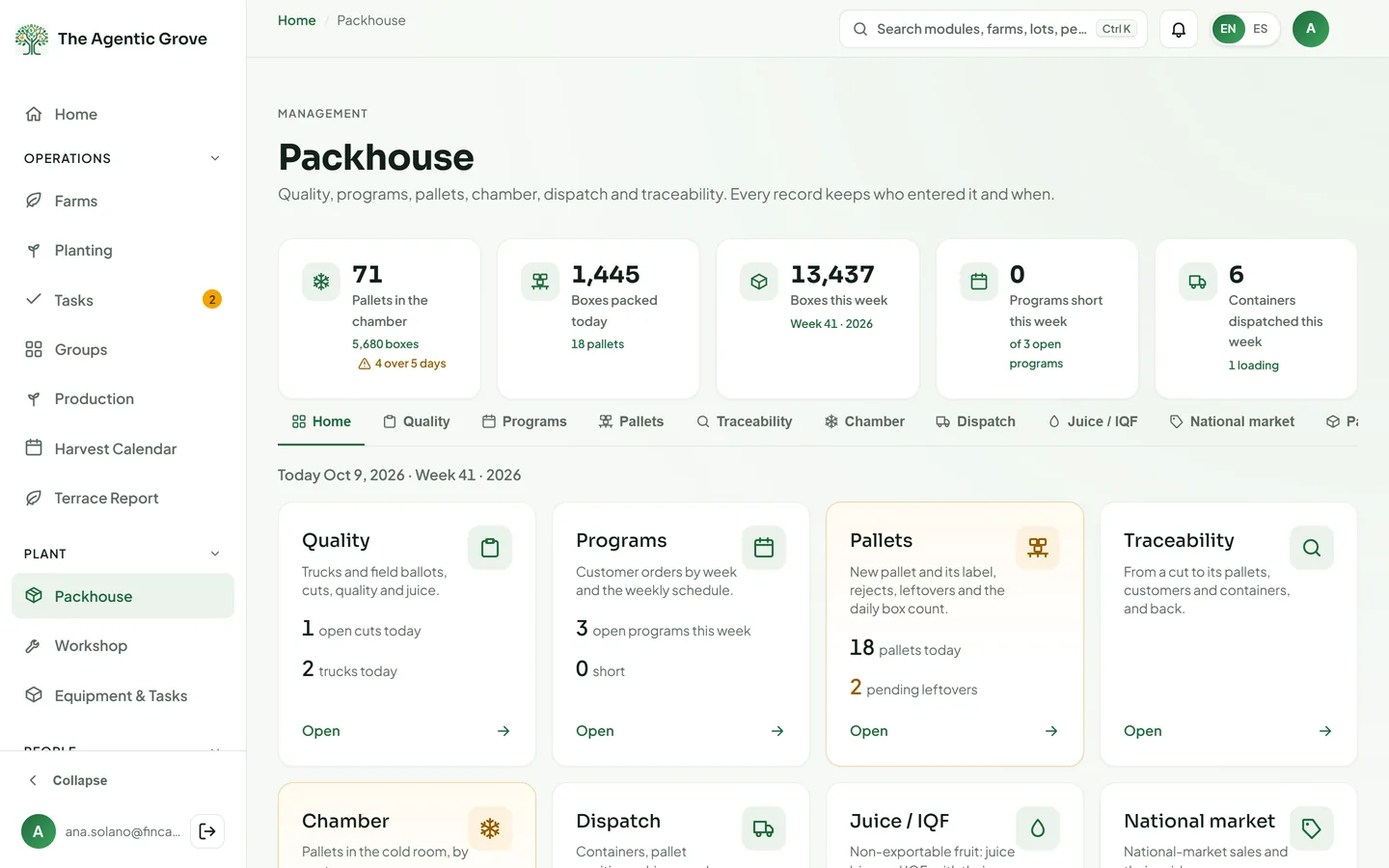
Packhouse
From trucks in to containers out, traced block to customer
Run the packing plant: receive the fruit, cut it for quality, build pallets, keep the cold chamber and load containers — with every pallet traceable to its blocks.
- Reception and qualityTrucks with field ballots and their origin — farm, lot, block and forcing group; a quality-control sheet per truck with your own attributes and defect types, and the estimated truck kilos it yields; cuts for your own fruit or maquila, juice by cut, producers.
- Programs and palletsWeekly customer programs by ISO week; pallets with printed Code 128 labels; rejects, leftovers, the daily box count and downtime.
- Cold chamber and dispatchStock by customer with an aging alert; containers loaded by position and dispatched in one step, with a printed loading guide.
- TraceabilitySearch by cut, pallet, container or customer; trace sheets and a packing slip.
- ReportsSchedule, quality, quality control, palletizing, packing slip, export, national market, mass balance, chamber, trace, production and downtime — to Excel or print.
- Connected and accountableAccess by area; every void needs a reason and nothing is deleted; a closed farm cut can be sent to Production, and a dispatched container turned into a draft invoice in Finance, in one step.
Workshop
Maintenance, parts and diesel for every machine
The workshop manager runs work orders, preventive schedules and the parts warehouse — without ever seeing payroll.
- Work ordersMechanics' hours (normal, extra, double), parts issued from stock, external services, checklists and photos, printed as a document.
- Preventive maintenanceThe next service from the hour meter, a weekly schedule, and the useful life of each machine's components.
- Spare-parts warehouseNumbered entries and exits, suppliers, kardex and physical counts; posted documents are corrected or voided, never deleted.
- DieselPurchases and dispensing per machine with the hour meter, dispensing-sheet import, litres per hour and pump-vs-field reconciliation.
- Reports and importsReports — machine hours, lot cost, cost by machine, jobs, preventive, labor, status and outflows — and Memento hour-meter files imported directly.
Equipment & Tasks
The machines and tasks every hour is costed against
One master list of machines and field tasks, with the hourly rates the Cost Model uses.
- Starter libraryLoad 20 machines and 78 field tasks to start from, then adjust them.
- Machine codes and ratesThe machine type comes from the code prefix; an hourly rate and currency per machine, or the workshop's upkeep rate.
- Task codesEvery task with a category and a downtime flag.
- Slip typesThe seed (slip) types that Planting records.
- Active or notSwitch a machine or task off when it is no longer used.
People
Payroll, and the safety of the people who do the work.
Human Resources
Costa Rican payroll, from the time grid to the bank file
Built on Costa Rican labour rules — overtime, quincena, aguinaldo, vacations, incapacities, settlements and the CCSS — with the files a company actually turns in.
- EmployeesFiles with personal data visible to Admins only, rate and salary history, deductions and licence-expiry alerts; a field-by-field change history, and change control with approvals for the personnel data HR shares with Planting.
- Time, overtime and piece workA time grid with schedules, or the Kizeo timesheet (R-CTC-0001) imported; overtime derived, then approved; contract work by labor code and block, with the legal minimum-wage guarantee; hours by lot.
- Vacations and leaveAccrual and balances by year of service; CCSS and INS incapacities, maternity, paternity and unpaid leave, split between the company and the institution.
- Payroll runsWeekly, every two weeks, quincena or monthly by pay group; statutory, income-tax, loan and garnishment deductions; finalized runs are locked.
- Settlements and outputsSettlements and payroll matching the Colegio de Contadores calculators — the 2026 income-tax table, the art. 29 cesantía table and the art. 172 garnishment limit; preaviso, cesantía and proportional aguinaldo; pay slips printed or emailed; the CCSS/SICERE monthly file and an IBAN-checked bank transfer file.
- Guided importsEmployees, pay rates, the weekly payroll sheet, time, contract work, vacation history and labor codes, each previewed before saving.
Integrated Management System (SGI)
Every work accident, followed through to return to work
Record accidents, follow each case with INS or the CCSS and measure the accident rate — with incapacities paid correctly through payroll.
- Record an accidentThe employee from HR, date, place, event type, INS or CCSS, boleta and case numbers, injury, trauma and work stoppage.
- CasesNumbered cases; incapacity days and the return date calculated; appointments and corrective actions; voided, never deleted.
- Linked to payrollIncapacities flow into HR leave, so payroll pays the right company and institution split.
- Follow-upA queue of returns due, appointments and open actions.
- Indicators and reportsFrequency, severity, incidence and days lost (ILO or OSHA factors), hours worked by month and department, and reports to Excel or print.
- INS pack, resolution and headcountThe INS policy, the 3-month salary report and the IBAN taken from HR for each case, with any gap flagged; the INS resolution status; hours worked and headcount by men and women behind the indicators.
Commercial
Buyers and the price list.
CRM
Buyers matched to harvest windows
A pipeline for retail, discount and foodservice buyers by region, with offers and the full history of every account — tied to what the farm will harvest.
- PipelineTen stages, from not contacted to closed, by region (Europe, Canada, the US, South America) and segment.
- OffersPrice offers in euros for Europe and in dollars elsewhere.
- Company cardsContacts, required certifications, notes and an activity log, edited inline.
- ConnectedFeeds supply vs demand in the Harvest Calendar, buyer eligibility in Compliance, the Packhouse and Finance customer lists, and follow-ups on Home.
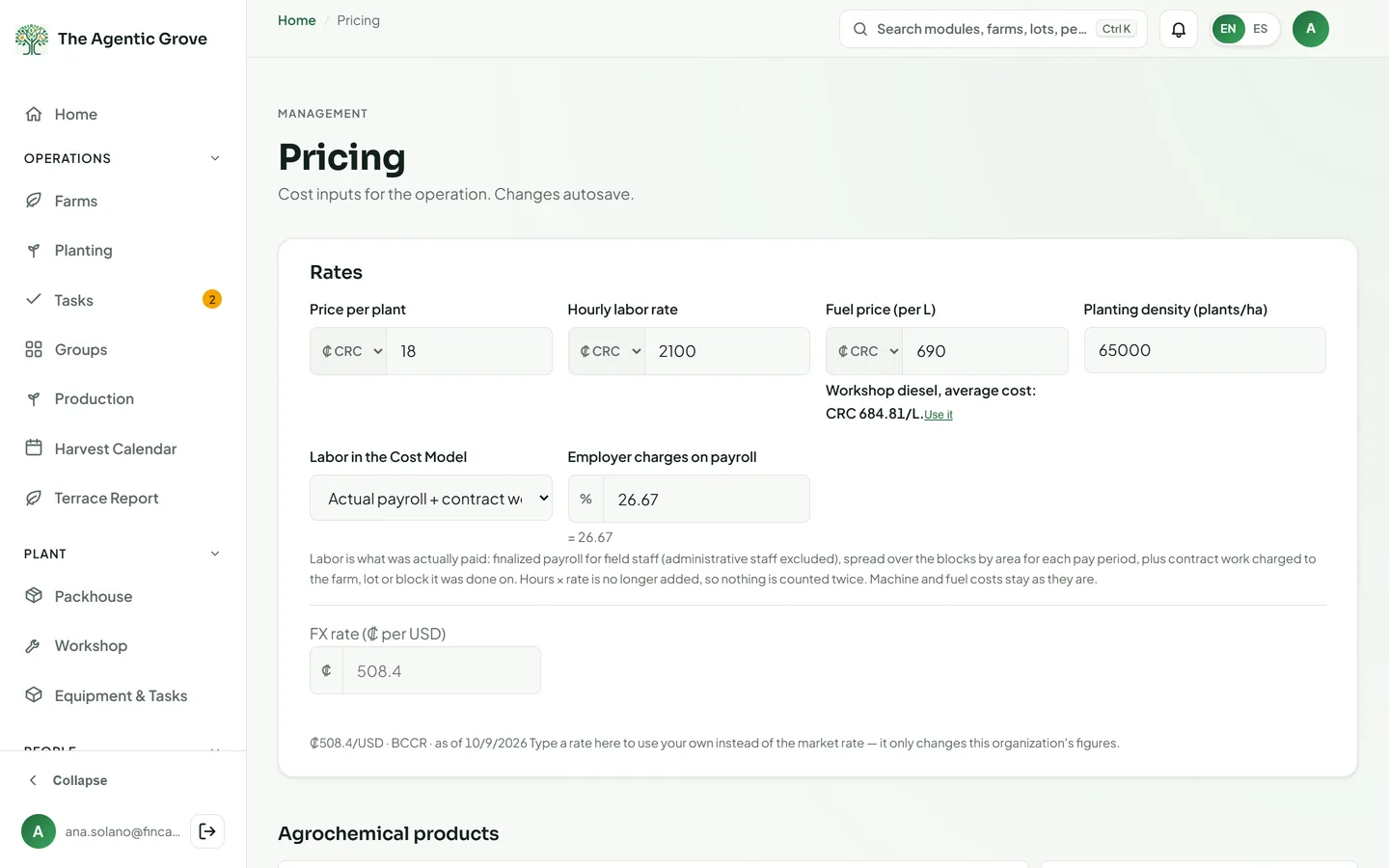
Pricing
The price list everything is costed from
Products, rates and the exchange rate in one place, so costs across the platform use the same prices.
- Agrochemical catalogBrand, unit, price, agreed price range, active ingredient, PHI days, re-entry interval and a restricted-for-export flag.
- RatesPrice per plant, hourly labor rate and fuel price, each in colones or dollars.
- Labor costingFrom field hours × rate or from actual payroll, plus employer charges.
- Exchange rateRefreshed automatically on the 1st and the 15th, or your own override.
- Gaps found for youMissing prices are flagged, with a link straight to the field to fill in.
Finance
The books, the costs and the numbers behind them.
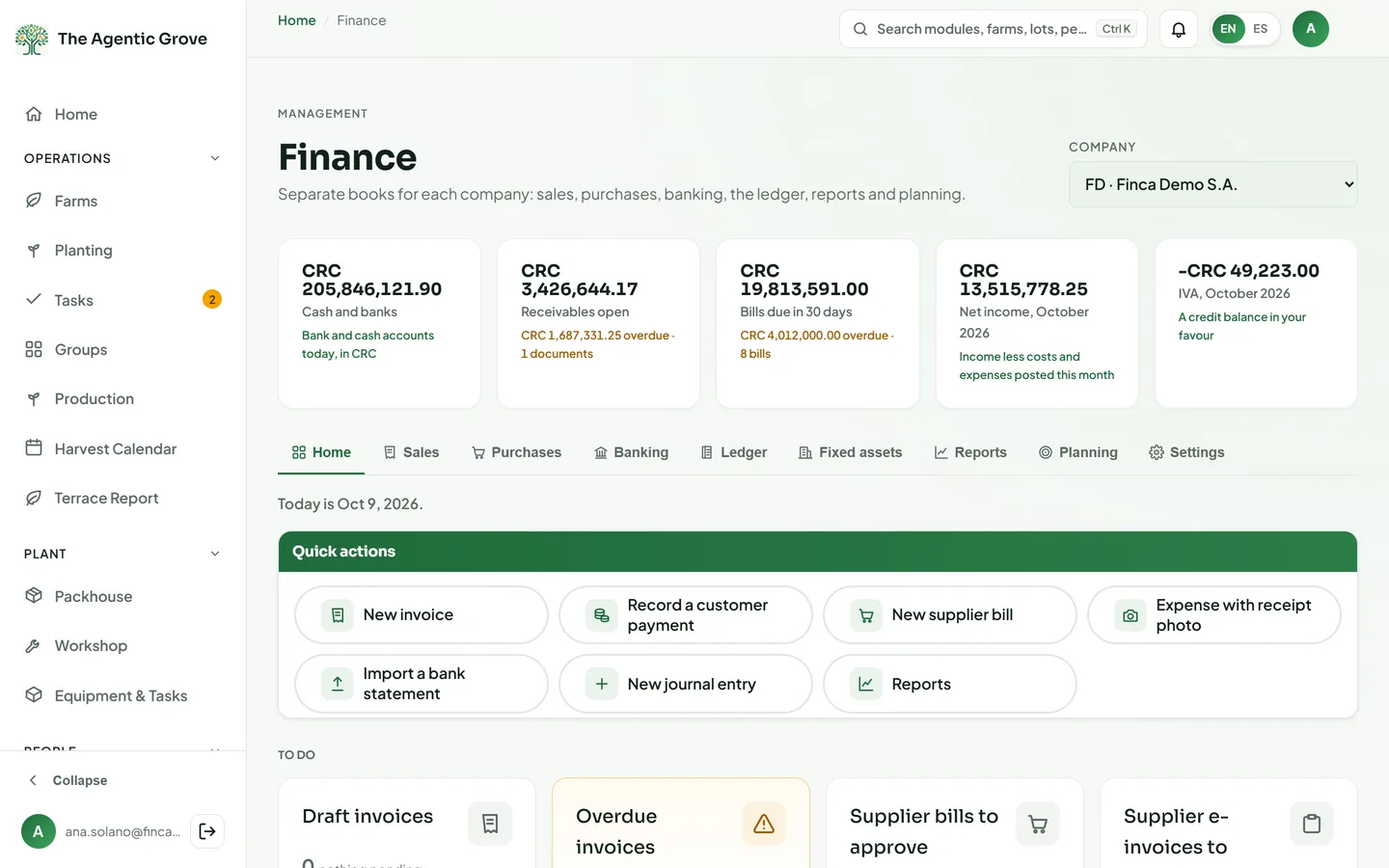
Finance
Accounting for each legal company, built to replace QuickBooks
Separate books for every company you run — sales, purchases, bank, ledger, statutory work and Hacienda — with invoices drafted from the packhouse.
- Books per companySeparate books for each legal entity in colones, dollars or euros; consolidated statements across them, translated into a presentation currency when their books differ.
- Sales and purchasesInvoices, credit notes, receipts, bills and expenses with receipt photos; purchase orders printed on the company's own official template, with approvals and a Firma Digital signature; draft invoices from Packhouse containers, national sales, juice and maquila.
- BankingStatements imported from CSV, Excel or OFX, then matched, categorized by rules and reconciled; the official BCCR exchange rate fetched twice a day. There are no live bank feeds.
- Ledger and closeA Costa Rican starter chart or a QuickBooks Online import — accounts with their balances, vendors in and back out; postings from payroll and the warehouse; FX revaluation, biological assets under IAS 16 and 41, period and year-end close; posted entries are reversed, never edited.
- Reports and statutory workP&L by farm, lot, department or project, balance sheet, cash flow, trial balance, AR/AP aging, budget vs actual and a cash forecast; the D-150 workpaper with its TRIBU-CR reconciliation and the annual prorrata, withholdings with their constancias, income-tax instalments, a 12-month obligations calendar with reminders, the legal books (Diario, Mayor, Inventarios y Balances) and a statements package in the Costa Rican CPA format with notes and ratios, to Word and Excel.
- Hacienda v4.4, ready to sendElectronic documents in Hacienda's version 4.4, signed with the company's own key held in a hardware security module and ready to send; each company switches sending on per document type.
Cost Model
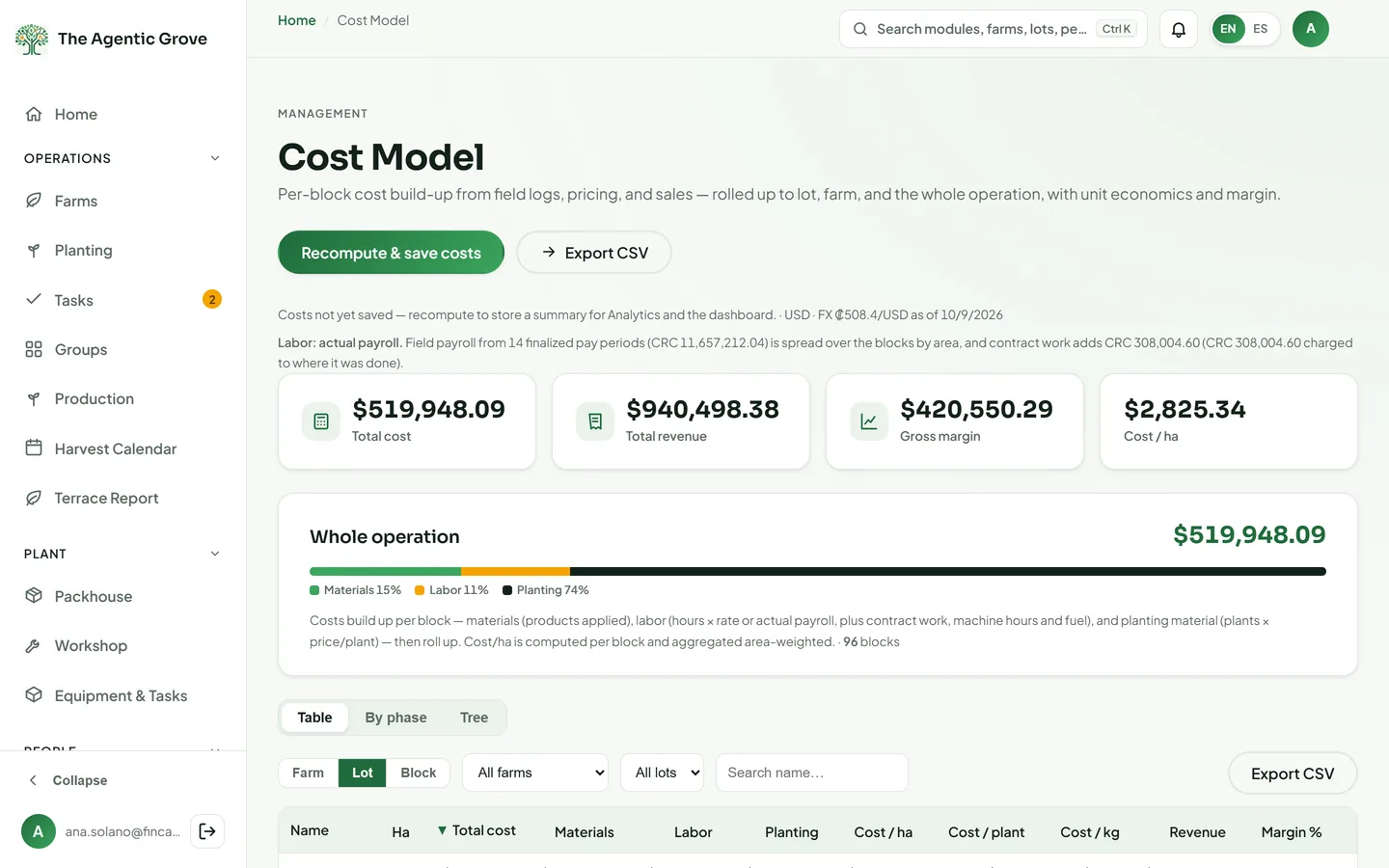
The true cost of every hectare, plant and kilo
One cost model fed by the whole platform: inputs at their price, labor from field hours or actual payroll, machines and fuel from the workshop.
- By block, lot and phaseMaterials, labor, planting material, machine hours and fuel, drilled down Farm → Lot → Block → Phase, with CSV.
- Labor the way you pay itField hours × rate, or finalized payroll plus contract work and hours by lot.
- Per hectare, plant and kiloArea-weighted cost per hectare, cost per surviving plant and per recorded kilo.
- MarginYour own fruit's invoiced sales in Finance against what the lot cost — margin and margin %.
- Reported in US dollarsInputs in colones or dollars are converted at the exchange rate and the report is in USD. Missing prices are flagged with a link to fix them.
Analytics
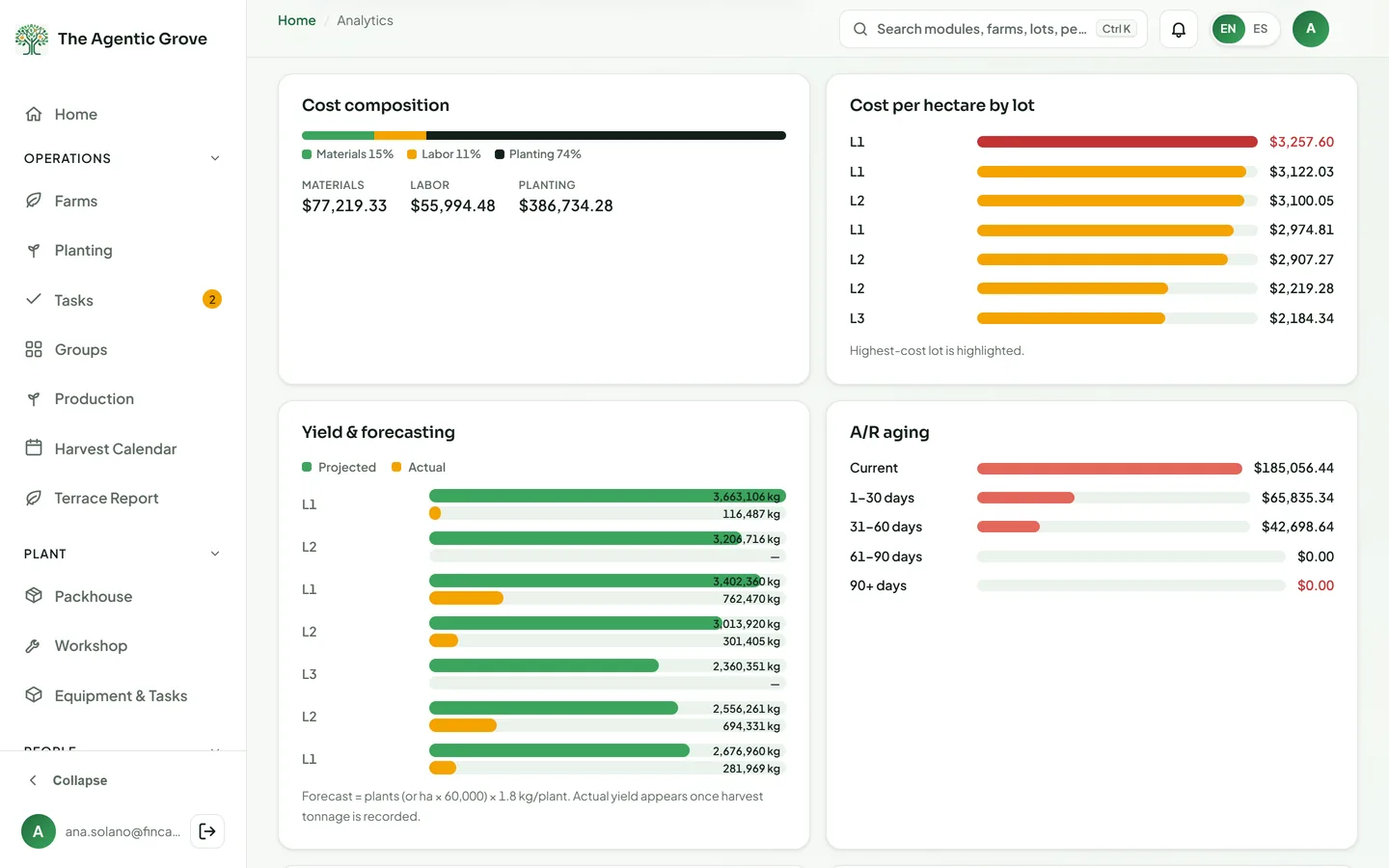
Four dashboards on the same records
Farm, Packhouse & Sales, Finance & Profitability and the Overview — for the whole company, one farm or one lot, drawn from the figures the other modules already keep.
- FarmQuarter planting and harvest plans against what the field logged, cumulative by week; direct cost per hectare, box, kilo and fruit over time with the prior cycle faintly behind it, and a drill-down into fuel, labor and supplies.
- Packhouse & SalesWeekly packed volume by origin — own fruit, maquila and external — selling price by category over time, and revenue and quantity by category and by customer.
- Finance & ProfitabilityA 4-week weighted gross profit, in percent and in dollars, by channel; profitability by area — revenue per hectare, box and kilo, and gross profit per hectare by farm, lot and block cycle, traced from the sales back to the blocks that produced them.
- OverviewCost composition and yield, A/R aging, the sales pipeline, machine use by machine, operator and task, and mortality and quality, with CSV.
- Smart alertsRule-based checks on the same screen, such as a lot costing well above the farm average, a sale below cost or a lot stuck too long in a phase.
AI Insights
Trends, forecasts and warnings computed from your own records.
AI Insights
Where your figures are heading, method in view
AI Insights reads the figures the platform already holds — costs, harvests, packed volume, prices, sales, gross profit, payroll — and shows where they are heading, what stands out and why. Every figure names its method, its confidence and its caveats.
- Trend analysisMoving averages, fitted trends, seasonality and change-points on cost per hectare, packed volume, reject rate, prices, revenue, gross profit, mortality, payroll and machine hours.
- Forecasts with intervalsHarvest kilos and boxes by week from your lifecycle dates, calibrated on your past harvests; selling prices and packed volume twelve weeks ahead with an 80% band; cost-to-complete for every cycle in progress — each with its method and its confidence.
- Anomalies and early warningsRobust outlier detection on every series, and nine plain rules with your own thresholds — a reject rate rising three weeks running, a price below its four-week average, cost per hectare above the prior twelve months, customers paying later, a stand loss, drift from the plan, forecast kilos short of buyer assignments, gross profit below its floor, projected cash below your limit.
- Drivers and benchmarksCost, revenue and gross-profit bridges between two periods — this one against the last, or the same period a year ago — budget variances by account, blocks ranked against their peers within the farm by cost, yield, gross profit, mortality and rejects, and the associations between them.
- Cash forecastThirteen weeks ahead for each company: open invoices by each customer's observed collection lag, supplier bills by due date, payroll on its own cadence, the tax calendar and the approved budget — closing balance per week, lowest point and runway, for people with a Finance grant.
- Explanations written by GeminiPlain-language explanations written by Gemini from the figures on screen, labelled with the model and the date; the numbers come first and the text only explains them.
Administration
Who gets in, what is certified, and getting started.
Users & Access
Exactly who sees and edits what
Invite your people, approve sign-ups and decide, person by person, what each one may open.
- InvitationsBy email with a role, in a branded bilingual message; sign-ups approved or rejected.
- Seven rolesOwner, admin, manager, field worker, tractor operator, planter and viewer.
- Access module by moduleNone, view or edit for each person, within the limits each module allows; view means read-only.
- Farms, areas and companiesField roles limited to the farms they work on; packhouse areas; a Finance level and the companies a person may see.
- Safe by designNobody can raise their own access, Admin rows are locked, and people in several companies switch between them.
Compliance
Ready for an auditor
The spray diary, pre-harvest intervals and certifications, built from the records the field already keeps.
- Spray diaryEvery application from the block logs — date, product, dose, worker, target pest, weather, authorization — with CSV.
- PHI per blockConflict, unverified or clear, with the safe harvest date.
- CertificationsGlobalG.A.P., GRASP, Rainforest Alliance, Organic, SPRING and Fair Trade presets, document upload and a warning 60 days before expiry.
- Buyer eligibilityWhich CRM buyers' required certifications you hold.
- Restricted products and reportsProducts flagged as restricted for export, and compliance reports ready to print.
- Renew and archive, never deleteCertifications, permits, authorizations and documents are edited, renewed or archived — never deleted — and every change is kept in their history.
Activity Log
Who did what in the field, and when
A permanent log of field actions, plus the trail each module keeps of its own records.
- Field actionsEntries added or removed, phase changes, harvests, photos, new farms, lots and blocks, plant counts, planting closed or reopened.
- Filters and CSVNarrow the log down and export it to CSV.
- Cannot be changedEach entry is stamped with the person who acted and cannot be edited.
- Every module keeps its trailThe Packhouse and Finance log every change; groups, H&S cases, employees, payroll runs and planting records keep their own history, and records are voided rather than deleted.
Setup & go-live
Live on your own data, tested before go-live
Import the farm, set the company up, run the test script on your own data before go-live, and keep the help inside the app.
- Import blocksYour Farm / Lot / Block / hectares spreadsheet, reconciled against its own subtotals; running it again updates in place and creates the 15 phases of every block.
- Setup wizardCompany profile, first farm, blocks, cost inputs and the team in five steps that can be skipped and resumed; a Getting started checklist tracks progress.
- Guided imports everywhereEmployees, payroll, time and vacation sheets, Kizeo timesheets, planting counts, programs, equipment, diesel, QuickBooks Online accounts and vendors, and bank statements, previewed with row-level errors.
- Test Script552 numbered tests in 43 sections, in English and Spanish, run and signed off before go-live; results to CSV or sent to our team.
- Guides inside the appA farm guide for crews and a management guide for the office, searchable, in both languages, with screenshots.
Built to be trusted with the whole company
One company's data is its own
Every record belongs to one company, and server-side rules keep other companies out of it — not just hidden on screen.
Roles and private data
Seven roles and access set module by module; pay and personal data for Admins only.
Bilingual, everywhere
Every screen, printout and customer email in English and Spanish.
Phone-first; field logs work offline
Installs as an app. Field logs, bulk logs, equipment hours and tasks queue without signal and sync later; planting saves and other transactional saves need a connection.
Imports with a preview
Farm layout, planting counts, employees, pay and time sheets, Kizeo timesheets, payroll and vacation sheets, programs, samples, equipment, diesel, hour meters, QuickBooks Online accounts and vendors, and bank statements.
Exports and printouts
Excel and CSV downloads; pay slips, work orders, record sheets, pallet labels, guides, invoices and reports to print or save as PDF.
Email from the platform
Invitations, welcome and password emails, and pay slips with their delivery status, in both languages.
Nightly backups
The whole database is exported every night, and every file is copied every night to a separate bucket that keeps them for five years.
Checks that watch your records for you
Plain, predictable rules run on your own records every time Home opens. When one finds something, it shows on Home and on the bell — so nothing waits for someone to notice.
- Harvests due soon
- Blocks stuck in a phase
- Overdue or soon-due invoices
- CRM follow-ups due
- Pending invitations
- Overdue tasks
- Pre-harvest interval (PHI) conflicts
- Certifications about to expire
- Pallets aging in the cold chamber
- Containers not yet invoiced
- Supplier bills due
- Supplier e-invoices awaiting acceptance before the Hacienda deadline
- Unmatched bank lines
- Tax obligations due: withholdings, income-tax instalments and the annual filings
- Planting corrections waiting for approval
- Personnel changes waiting for approval or review
Ready to run a smarter orchard?
See how The Agentic Grove brings your operations, buyers and numbers into one platform. Book a 30-minute walkthrough with our team.